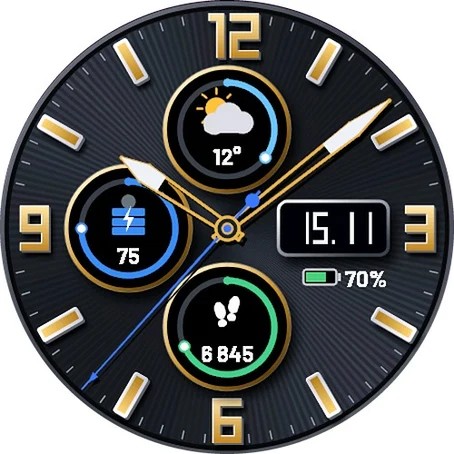
Obsidian Chrono
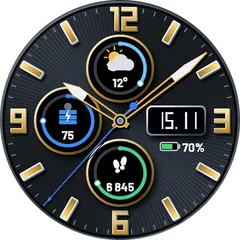
A sunray dial, raised gold numerals and markers, and three sub-dials with live progress rings. Skeleton sword hands let you see the dial right through them - with a silver tip and a blue second hand. ON THE FACE - Top sub-dial: weather icon and temperature, ring = chance of rain - Left sub-dial: Body Battery, ring = 0 to 100 - Bottom sub-dial: steps, ring = progress to your daily step goal - Date window with watch battery below (the icon empties and changes color) - Skeleton hands with a hard drop shadow for a real 3D look SETTINGS (Garmin Connect app - watch face settings) - Hands: gold, steel or rose gold - Dial color: graphite or midnight blue - Numerals and rings: gold or steel - Second hand: show or hide - Watch battery: icon with percent, icon only or hidden Want to choose every data field, more colors and hand styles? Look for Obsidian Chrono Pro. DETAILS - Uses the built-in Garmin weather (from your phone) - no extra app, no account - Always-On mode on AMOLED: dimmed markers and hand outlines, moved every minute against burn-in - Temperature in C or F follows your watch settings - Requires a watch with Connect IQ 4 or newer
- Works on
- 42 watches
- In store since
- 15 November 2026
- Updates
- once a minute
Works on 42 watches
32 with AMOLED displays and 10 with MIP displays. Pick yours and the site remembers it.
Forerunner
fēnix
vívoactive
Descent
Instinct
How to install
- Press “Get it in the Connect IQ Store”. On a phone it opens in the Connect IQ app.
- Press Install and pick your watch. The face arrives at the next sync.
- Hold the top-left button on the watch, choose Watch Face, select Obsidian Chrono.